
Supabase Complete Crash Course
Master Supabase — Postgres architecture, local dev with CLI, CRUD, Auth, Row Level Security, Realtime, Storage, and React integration with production patterns.
Introduction
Supabase is an open-source Firebase alternative built on PostgreSQL. You get a managed database, auto-generated REST and GraphQL APIs, authentication, row-level security, realtime subscriptions, and file storage — all wired together with a single project dashboard and JavaScript SDK.
Goal: learn to build full-stack apps with Postgres as a service and Supabase's complete feature set.
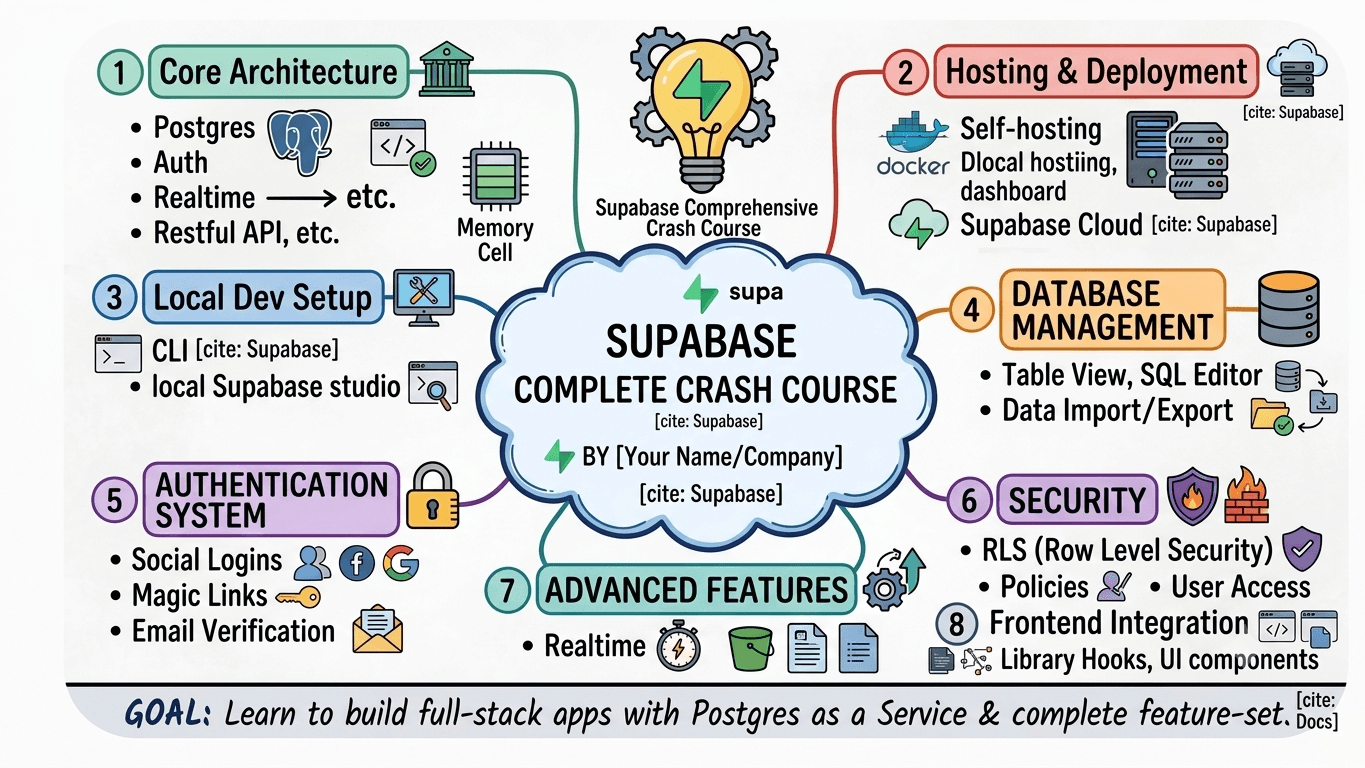
This guide covers every branch from the crash course mind map:
- Core architecture — Postgres, API layer, GoTrue, Kong, realtime security
- Hosting & deployment — Supabase Cloud vs self-hosting
- Local development — Docker, CLI, local Studio
- Database management — Table Editor, SQL Editor, schema, CRUD
- Authentication — sign up/in, SMTP, magic links, sessions, listeners
- Security (RLS) — policies for public, authenticated, and owner access
- Advanced features — Realtime subscriptions and Storage buckets
- Frontend integration — React SDK, env vars, hooks
- Best practices — production checklist
Screenshot topic coverage map
| Mind-map branch | Section | Key topics included |
|---|---|---|
| Core Architecture | §1 | Postgres, auto-API, GoTrue, Kong, built-in security |
| Hosting & Deployment | §2 | Supabase Cloud PaaS vs self-hosted Docker |
| Local Development | §3 | Docker Desktop, CLI, supabase init, local Studio |
| Database Management | §4 | Table Editor, SQL Editor, schema, Select/Insert/Update/Delete |
| Authentication System | §5 | Email, OAuth, magic links, SMTP, sessions, listeners |
| Security (RLS) | §6 | Row Level Security, public / auth / owner policies |
| Advanced Features | §7 | Realtime postgres changes, broadcast, Storage buckets |
| Frontend Integration | §8 | @supabase/supabase-js, env vars, React hooks |
| Best & Recommended | §9 | .env, RLS always on, service role key safety |
Quick index
1. Core architecture
Supabase is not a single service — it is a platform of integrated components:
Your App (React / Next.js)
        ↓
  Supabase Client SDK
        ↓
┌───────────────────────────────────────┐
│  Kong API Gateway                     │
│  ├── PostgREST  → auto REST API     │
│  ├── GoTrue     → Auth (JWT)        │
│  ├── Realtime   → WebSocket changes │
│  └── Storage    → file buckets      │
└───────────────────────────────────────┘
        ↓
PostgreSQL Database| Component | Role |
|---|---|
| PostgreSQL | Core database — tables, relations, SQL, extensions |
| Auto-generated API | PostgREST exposes tables as REST endpoints instantly |
| GoTrue | Auth server — JWT tokens, OAuth, magic links |
| Kong | API gateway routing requests to services |
| Realtime | Listens to Postgres WAL, broadcasts changes |
| Storage | S3-compatible file buckets with RLS policies |
| Built-in security | Row Level Security enforced at the database layer |
2. Hosting & deployment
Supabase Cloud (managed PaaS)
| Benefit | Detail |
|---|---|
| Zero infrastructure | No Docker, no VPS management |
| Fast prototyping | Project live in minutes at supabase.com |
| Managed backups & scaling | Handled by Supabase team |
| Dashboard included | Table Editor, Auth settings, SQL Editor |
Best for: MVPs, startups, solo developers, and teams that want managed Postgres without DevOps overhead.
Self-hosting (full data control)
Run the entire Supabase stack on your own VPS with Docker:
git clone https://github.com/supabase/supabase
cd supabase/docker
cp .env.example .env
docker compose up -d| Benefit | Trade-off |
|---|---|
| Full data sovereignty | You manage updates, backups, scaling |
| Custom VPS / on-prem | Operational responsibility |
| Docker containers | Requires Docker Desktop or Linux server |
| Use case | Recommendation |
|---|---|
| Side project / MVP | Supabase Cloud free tier |
| Production SaaS | Supabase Cloud Pro |
| Regulated / on-prem | Self-hosted Docker |
| Existing Postgres | Supabase CLI migrations only |
3. Local development setup
Develop against a local Supabase stack that mirrors production — same Postgres, Auth, and API layer.
Prerequisites
| Tool | Purpose |
|---|---|
| Docker Desktop | Runs local Supabase containers |
| Node.js | Frontend / CLI tooling |
| Git | Version-control migrations |
| Supabase CLI | Local dev, migrations, types |
Install CLI & initialize
npm install -g supabase
# or: brew install supabase/tap/supabase

supabase login
supabase init          # creates supabase/ folder in project
supabase start         # starts local Docker stack
After supabase start, the CLI prints local credentials:
API URL:     http://127.0.0.1:54321
DB URL:      postgresql://postgres:postgres@127.0.0.1:54322/postgres
Studio URL:  http://127.0.0.1:54323
anon key:    eyJ...
service_role key: eyJ...
Local Supabase Studio
Open Studio URL in the browser — same dashboard as Cloud (Table Editor, SQL Editor, Auth users, Storage) running locally.
supabase stop          # stop containers
supabase db reset      # wipe + re-run migrations + seed
supabase status # show running URLs and keys4. Database management & CRUD
Schema design with SQL migration
-- supabase/migrations/20260703000000_create_posts.sql
create table public.posts (
  id          uuid primary key default gen_random_uuid(),
  title       text not null,
  content     text,
  published   boolean default false,
  author_id   uuid references auth.users(id) on delete cascade,
  created_at  timestamptz default now(),
  updated_at  timestamptz default now()
);

create index posts_author_id_idx on public.posts (author_id);
Apply locally:
supabase db push
# or: supabase migration up
Table Editor vs SQL Editor
| Tool | Best for |
|---|---|
| Table Editor | Visual CRUD, quick prototyping, non-devs |
| SQL Editor | Complex queries, migrations, RLS policies |
CRUD with the JavaScript client
import { createClient } from '@supabase/supabase-js'

const supabase = createClient(process.env.NEXT_PUBLIC_SUPABASE_URL!, process.env.NEXT_PUBLIC_SUPABASE_ANON_KEY!)

// SELECT — fetch data
const { data: posts, error } = await supabase
  .from('posts')
  .select('id, title, content, created_at')
  .eq('published', true)
  .order('created_at', { ascending: false })
  .limit(10)

// INSERT — add rows
const { data: newPost, error: insertError } = await supabase
  .from('posts')
  .insert({ title: 'Hello Supabase', content: 'First post', author_id: userId })
  .select()
  .single()

// UPDATE — modify data
await supabase.from('posts').update({ title: 'Updated title', updated_at: new Date().toISOString() }).eq('id', postId)

// DELETE — remove rows
await supabase.from('posts').delete().eq('id', postId)
Filter operators
const { data } = await supabase
  .from('posts')
  .select('*')
  .eq('published', true) // equals
  .neq('author_id', userId) // not equal
  .gt('created_at', '2026-01-01') // greater than
  .ilike('title', '%supabase%') // case-insensitive search
.in('id', ['uuid-1', 'uuid-2']) // in list5. Authentication system
Supabase Auth (GoTrue) handles sign-up, sign-in, sessions, and JWT tokens — integrated with Postgres auth.users.
Email & password sign up
const { data, error } = await supabase.auth.signUp({
  email: 'kazi@example.com',
  password: 'secure-password-here',
  options: {
    emailRedirectTo: `${window.location.origin}/auth/callback`,
  },
})
Sign in
const { data, error } = await supabase.auth.signInWithPassword({
  email: 'kazi@example.com',
  password: 'secure-password-here',
})
Magic link (passwordless)
await supabase.auth.signInWithOtp({
  email: 'kazi@example.com',
  options: { emailRedirectTo: `${window.location.origin}/auth/callback` },
})
OAuth — Google, GitHub, etc.
await supabase.auth.signInWithOAuth({
  provider: 'github',
  options: { redirectTo: `${window.location.origin}/auth/callback` },
})
Enable providers in Dashboard → Authentication → Providers.
SMTP & email verification
Configure a custom SMTP provider (SendGrid, Resend, AWS SES) in Dashboard → Authentication → Email Templates for production deliverability. Supabase sends confirmation and magic-link emails through this provider.
Session persistence & auth state listener
// Get current session on load
const {
  data: { session },
} = await supabase.auth.getSession()

// Listen for auth changes (login, logout, token refresh)
supabase.auth.onAuthStateChange((event, session) => {
  console.log(event, session?.user?.email)
  if (event === 'SIGNED_IN') {
    /* redirect to dashboard */
  }
  if (event === 'SIGNED_OUT') {
    /* redirect to login */
  }
})

// Sign out
await supabase.auth.signOut()6. Row Level Security (RLS)
RLS is Supabase's core security model — Postgres enforces access at the row level, not in application code. Every table exposed via the API should have RLS enabled.
-- Enable RLS on the table
alter table public.posts enable row level security;
Public read access
Anyone (including unauthenticated) can read published posts:
create policy "Public posts are viewable by everyone"
  on public.posts for select
  using (published = true);
Authenticated users only
Only logged-in users can insert:
create policy "Authenticated users can create posts"
  on public.posts for insert
  to authenticated
  with check (auth.uid() = author_id);
User-specific (owner) access
Users can only update or delete their own posts:
create policy "Users can update own posts"
  on public.posts for update
  to authenticated
  using (auth.uid() = author_id)
  with check (auth.uid() = author_id);

create policy "Users can delete own posts"
  on public.posts for delete
  to authenticated
using (auth.uid() = author_id);| Policy type | using clause | Typical use |
|---|---|---|
| Public read | published = true | Blog posts, product catalog |
| Authenticated | to authenticated | Any logged-in user can insert |
| Owner-only | auth.uid() = author_id | Profile, private drafts |
| Admin role | Custom JWT claim check | Role-based access |
7. Realtime & Storage
Realtime — Postgres changes subscription
Subscribe to INSERT, UPDATE, DELETE events on a table:
const channel = supabase
  .channel('posts-changes')
  .on('postgres_changes', { event: '*', schema: 'public', table: 'posts' }, (payload) => {
    console.log('Change:', payload.eventType, payload.new)
    // Update React state for live UI sync
  })
  .subscribe()

// Cleanup on unmount
channel.unsubscribe()
Enable Realtime on a table in Dashboard → Database → Replication or:
alter publication supabase_realtime add table public.posts;Broadcast — client-to-client messages
const room = supabase.channel('room:lobby')

room.on('broadcast', { event: 'cursor-move' }, ({ payload }) => {
  console.log('Cursor:', payload)
})

room.subscribe(async (status) => {
  if (status === 'SUBSCRIBED') {
    room.send({ type: 'broadcast', event: 'cursor-move', payload: { x: 100, y: 200 } })
  }
})
Storage — file uploads
Create buckets in Dashboard → Storage (public or private):
// Upload file
const { data, error } = await supabase.storage.from('avatars').upload(`public/${userId}.png`, file, { upsert: true })

// Public URL (public buckets only)
const {
  data: { publicUrl },
} = supabase.storage.from('avatars').getPublicUrl(`public/${userId}.png`)

// Private bucket — signed URL (expires)
const { data: signed } = await supabase.storage.from('private-docs').createSignedUrl('reports/q1.pdf', 3600) // 1 hour
Storage RLS policies
-- Users can upload to their own folder
create policy "Users upload own avatar"
  on storage.objects for insert
  to authenticated
  with check (
    bucket_id = 'avatars'
    and (storage.foldername(name))[1] = auth.uid()::text
);8. React frontend integration
Install SDK & environment variables
npm install @supabase/supabase-js @supabase/ssr# .env.local
NEXT_PUBLIC_SUPABASE_URL=https://your-project.supabase.co
NEXT_PUBLIC_SUPABASE_ANON_KEY=eyJ...your-anon-key
# NEVER expose service_role in frontend
SUPABASE_SERVICE_ROLE_KEY=eyJ...server-onlyClient initialization (Next.js App Router)
// lib/supabase/client.ts — browser client
import { createBrowserClient } from '@supabase/ssr'

export function createClient() {
  return createBrowserClient(process.env.NEXT_PUBLIC_SUPABASE_URL!, process.env.NEXT_PUBLIC_SUPABASE_ANON_KEY!)
}// lib/supabase/server.ts — Server Components / Route Handlers
import { createServerClient } from '@supabase/ssr'
import { cookies } from 'next/headers'
export async function createClient() {
const cookieStore = await cookies()
return createServerClient(process.env.NEXT_PUBLIC_SUPABASE_URL!, process.env.NEXT_PUBLIC_SUPABASE_ANON_KEY!, {
cookies: {
getAll: () => cookieStore.getAll(),
setAll: (cookiesToSet) => {
cookiesToSet.forEach(({ name, value, options }) => cookieStore.set(name, value, options))
},
},
})
}React hook — auth state
'use client'

import { useEffect, useState } from 'react'
import { createClient } from '@/lib/supabase/client'
import type { User } from '@supabase/supabase-js'

export function useUser() {
  const supabase = createClient()
  const [user, setUser] = useState<User | null>(null)
  const [loading, setLoading] = useState(true)

  useEffect(() => {
    supabase.auth.getSession().then(({ data: { session } }) => {
      setUser(session?.user ?? null)
      setLoading(false)
    })

    const {
      data: { subscription },
    } = supabase.auth.onAuthStateChange((_event, session) => {
      setUser(session?.user ?? null)
    })

    return () => subscription.unsubscribe()
  }, [supabase])

  return { user, loading }
}
Fetch posts with auth
'use client'

import { useEffect, useState } from 'react'
import { createClient } from '@/lib/supabase/client'

type Post = { id: string; title: string; content: string }

export function PostList() {
  const supabase = createClient()
  const [posts, setPosts] = useState<Post[]>([])

  useEffect(() => {
    supabase
      .from('posts')
      .select('id, title, content')
      .eq('published', true)
      .then(({ data }) => setPosts(data ?? []))
  }, [supabase])

  return (
    <ul>
      {posts.map((post) => (
        <li key={post.id}>{post.title}</li>
      ))}
    </ul>
  )
}9. Best practices
Generate TypeScript types from schema
supabase gen types typescript --project-id your-project-ref > src/types/database.tsimport { createClient } from '@supabase/supabase-js'
import type { Database } from '@/types/database'
const supabase = createClient<Database>(url, anonKey)
// posts table is fully typed
const { data } = await supabase.from('posts').select('*')Environment & Git
.env
.env.local
supabase/.temp/Summary
Supabase delivers Postgres as a service with Auth, Realtime, Storage, and auto-generated APIs in one platform. Start local with the CLI, model data in SQL migrations, lock down access with RLS, and wire React with @supabase/ssr. Every crash-course topic — architecture, hosting, CRUD, auth, security, realtime, storage, and frontend hooks — is covered above.
Related reads: Prisma ORM Deep Dive for schema-first ORM patterns alongside Supabase, and MERN Course: MongoDB Essentials for comparing document vs relational approaches.
Subscribe to my newsletter
Stay up to date and get notified when I share new contents.
No spam ever, unsubscribe anytime