
Prisma ORM Deep Dive
Master Prisma ORM — schema modeling, migrations, type-safe CRUD, relationships, advanced queries, Prisma Studio, middleware, and production best practices for Node.js and Next.js.
Introduction
Prisma is a modern ORM that sits between your application and database — giving you a
type-safe, auto-generated client from a declarative schema. Write models in schema.prisma, run prisma generate,
and every query is autocompleted and validated at compile time.
Unlike raw SQL strings or loosely typed query builders, Prisma turns your database into a TypeScript API:
- What is Prisma? — architecture, type safety, database bridge
- Core workflow —
init,generate,db push,migrate dev - Data modeling — User / Post / Tag models, attributes, constraints
- CRUD operations — create, read, update, delete, upsert (single + batch)
- Advanced queries —
select,where,orderBy, case-insensitive search - Relationships — one-to-one, one-to-many, many-to-many, self-referencing
- Database interaction — Studio, raw SQL, migrations, CI/CD
- Middleware & optimization — client extensions, error handling
- Best practices —
.env,.gitignore, singleton client, production checklist
Each section maps to the Prisma ORM topic guide and includes runnable examples.
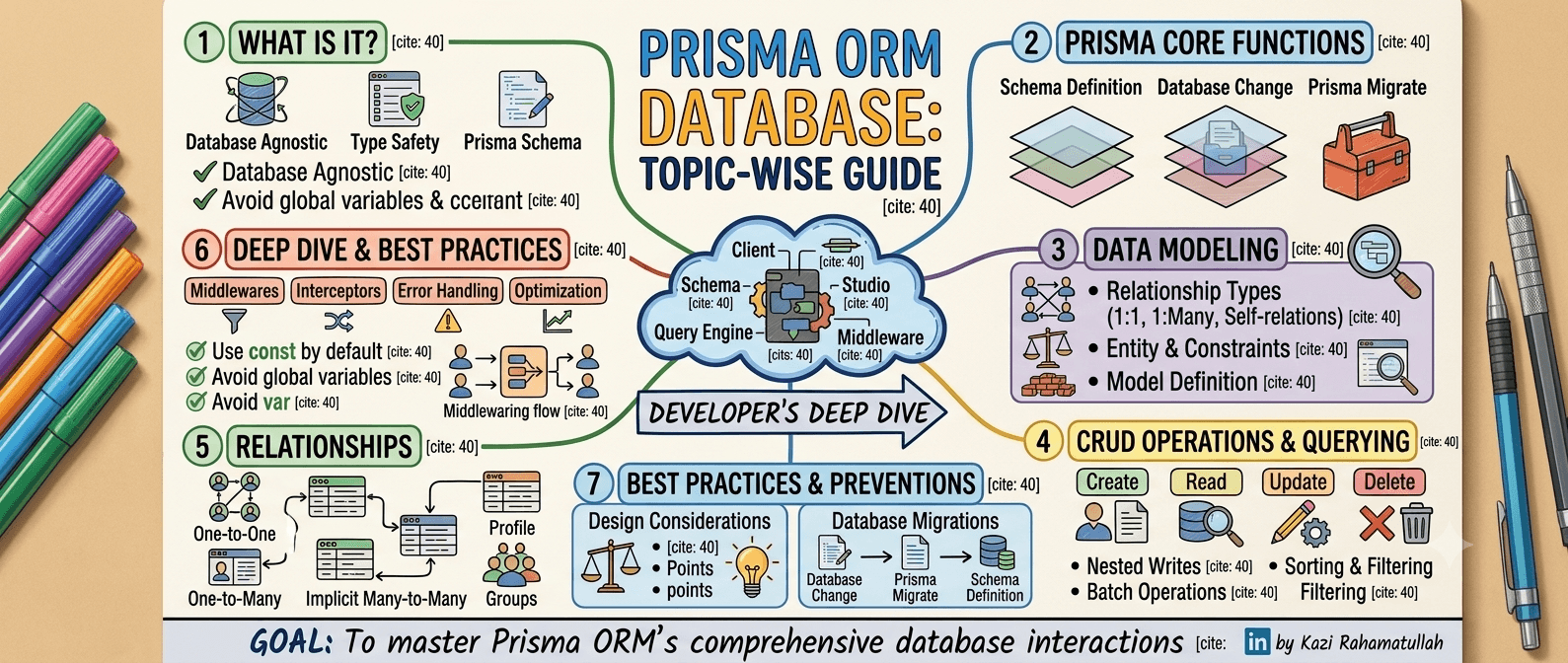
Screenshot topic coverage map
| Mind-map branch | Covered in section | Key topics included |
|---|---|---|
| Introduction / Features | §1 | Type safety, DX, database bridge, auto-generated queries |
| Core Workflow | §2 | prisma init, generate, db push, migrate dev |
| Data Modeling | §3 | User / Post / Tag, @id, @unique, @map, @updatedAt |
| Database Interaction | §7 | Studio GUI, raw SQL, migration history, CI/CD pipeline |
| CRUD & Queries | §4–§5 | CRUD, batch ops, findUnique / findMany / findFirst |
| Relationships | §6 | 1:1, 1:N, implicit & explicit M:N, self-referencing |
| Middleware & Interceptors | §8 | $extends, logging, soft-delete interceptors |
| Best & Recommended | §8–§9 | .env, .gitignore, Studio, error codes, docs |
Quick index
| # | Section |
|---|---|
| 1 | What is Prisma? |
| 2 | Core workflow |
| 3 | Data modeling |
| 4 | CRUD operations |
| 5 | Advanced queries |
| 6 | Relationships |
| 7 | Database interaction |
| 8 | Middleware & optimization |
| 9 | Best practices |
1. What is Prisma?
Prisma is a full-stack database toolkit built around five components:
| Component | Role |
|---|---|
| Prisma Schema | Single source of truth — models, relations, datasource |
| Prisma Client | Auto-generated, type-safe query API |
| Query Engine | Rust-based engine that translates Client calls to SQL |
| Prisma Migrate | Version-controlled SQL migrations |
| Prisma Studio | Visual database browser (GUI) |
Your App (TypeScript)
        ↓
  Prisma Client  ← auto-generated, 100% typed
        ↓
  Query Engine   ← compiles queries to SQL
        ↓
  Database (PostgreSQL, MySQL, MongoDB, …)
Key features (from the crash course)
| Feature | Benefit |
|---|---|
| Stream database bridge | One schema connects app logic to any supported DB |
| 100% type safety | Compile-time errors on invalid fields or relations |
| Developer experience | Autocomplete, readable API, minimal boilerplate |
| Pro-level data schema | Declarative models with relations and constraints |
| Auto-generated queries | No manual SQL for standard CRUD |
| Migration history | Track schema changes in Git for team + CI/CD |
// Type-safe — IDE knows user.email exists
const user = await prisma.user.findUnique({
  where: { email: 'kazi@example.com' },
  include: { posts: true },
})

console.log(user?.posts[0]?.title) // fully typed2. Core workflow
The standard Prisma lifecycle: init → model → sync → generate → query.
Step 1 — Initialize
npm install prisma @prisma/client
npx prisma init
Creates:
prisma/
  schema.prisma
.env # DATABASE_URL// prisma/schema.prisma
generator client {
provider = "prisma-client-js"
}
datasource db {
provider = "postgresql"
url = env("DATABASE_URL")
}# .env
DATABASE_URL="postgresql://user:password@localhost:5432/mydb?schema=public"Supported database connectors
Change the provider in schema.prisma to switch databases:
| Provider | datasource db value | Notes |
|---|---|---|
| PostgreSQL | postgresql | Recommended for production; full feature set |
| MySQL | mysql | Common in MERN + SQL stacks |
| SQLite | sqlite | Local dev, tests, embedded apps |
| MongoDB | mongodb | Document DB — relations work differently |
| SQL Server | sqlserver | Enterprise Windows stacks |
// PostgreSQL
datasource db {
  provider = "postgresql"
  url      = env("DATABASE_URL")
}

// MongoDB example
datasource db {
  provider = "mongodb"
  url      = env("DATABASE_URL")
}Step 2 — Define models & sync schema
Prototype / local dev — push schema without migration files:
npx prisma db pushTeam / production — tracked migrations:
npx prisma migrate dev --name init| Command | When to use |
|---|---|
prisma db push | Prototyping, solo dev, throwaway DBs |
prisma migrate dev | Shared projects, staging, production |
prisma migrate deploy | CI/CD — apply pending migrations in prod |
Step 3 — Generate client
Regenerates @prisma/client with type-safe auto-functions — every model gets findMany, create, update, etc. with full TypeScript inference.
npx prisma generate{
"scripts": {
"postinstall": "prisma generate"
}
}Step 4 — Query in application code
// lib/prisma.ts
import { PrismaClient } from '@prisma/client'

const globalForPrisma = globalThis as unknown as { prisma: PrismaClient }

export const prisma = globalForPrisma.prisma ?? new PrismaClient()

if (process.env.NODE_ENV !== 'production') globalForPrisma.prisma = prisma// app/api/users/route.ts
import { prisma } from '@/lib/prisma'
export async function GET() {
const users = await prisma.user.findMany()
return Response.json(users)
}3. Data modeling
Models map to database tables. Fields map to columns with Prisma attributes controlling keys, defaults, and timestamps.
model User {
  id        String   @id @default(cuid())
  email     String   @unique
  name      String?
  role      Role     @default(USER)
  createdAt DateTime @default(now())
  updatedAt DateTime @updatedAt
  posts     Post[]

  @@map("users") // table name in DB
}

model Post {
  id        String   @id @default(cuid())
  title     String
  slug      String   @unique
  published Boolean  @default(false)
  authorId  String
  author    User     @relation(fields: [authorId], references: [id], onDelete: Cascade)
  tags      Tag[]
  createdAt DateTime @default(now())
  updatedAt DateTime @updatedAt

  @@map("posts")
}

model Tag {
  id    String @id @default(cuid())
  name  String @unique
  posts Post[]

  @@map("tags")
}

enum Role {
  USER
  ADMIN
}
Common attributes
| Attribute | Purpose |
|---|---|
@id | Primary key |
@default(...) | Default value (now(), cuid(), uuid()) |
@unique | Unique constraint |
@updatedAt | Auto-set on every update |
@map("col") | Map field name to different column name |
@@map("tbl") | Map model name to different table name |
@relation | Foreign key + relation definition |
Entity constraints & indexes
Beyond field-level attributes, enforce rules at the model level:
model User {
  id    String @id @default(cuid())
  email String
  name  String

  @@unique([email])              // composite or single-field unique
  @@index([name])                // speed up WHERE / ORDER BY on name
  @@map("users")
}

model Post {
  id        String @id @default(cuid())
  authorId  String
  published Boolean @default(false)

  @@index([authorId, published]) // compound index for filtered lists
  @@map("posts")
}| Constraint | Syntax | Use case |
|---|---|---|
| NOT NULL | String (no ?) | Required fields |
| Optional | String? | Nullable columns |
| Unique | @unique or @@unique([a, b]) | Email, slug, composite keys |
| Index | @@index([field]) | Query performance on filters/sort |
| Default | @default(...) | Auto-fill on create |
| Cascade | onDelete: Cascade | Delete children when parent deleted |
4. CRUD operations
Create
// Single record
const user = await prisma.user.create({
  data: {
    email: 'kazi@example.com',
    name: 'Kazi Rahamatullah',
  },
})

// Batch create
const result = await prisma.user.createMany({
  data: [
    { email: 'a@example.com', name: 'Alice' },
    { email: 'b@example.com', name: 'Bob' },
  ],
  skipDuplicates: true, // ignore unique constraint violations
})

console.log(result.count) // 2
Read
// By unique field
const user = await prisma.user.findUnique({
  where: { email: 'kazi@example.com' },
})

// First match
const firstAdmin = await prisma.user.findFirst({
  where: { role: 'ADMIN' },
  orderBy: { createdAt: 'asc' },
})

// Many records
const posts = await prisma.post.findMany({
  where: { published: true },
  take: 10,
  skip: 0,
})
Update
const updated = await prisma.user.update({
  where: { id: 'clx123' },
  data: { name: 'Kazi R.' },
})

// Update many
await prisma.post.updateMany({
  where: { published: false },
  data: { published: true },
})
Delete
await prisma.post.delete({
  where: { id: 'clx456' },
})

await prisma.user.deleteMany({
  where: { role: 'USER', createdAt: { lt: new Date('2020-01-01') } },
})
Upsert (update or create)
const user = await prisma.user.upsert({
  where: { email: 'kazi@example.com' },
  update: { name: 'Kazi Updated' },
  create: { email: 'kazi@example.com', name: 'Kazi Rahamatullah' },
})5. Advanced queries
Select specific fields
const users = await prisma.user.findMany({
  select: {
    id: true,
    email: true,
    name: true,
    // password excluded — not fetched from DB
  },
})
Filtering with where
const posts = await prisma.post.findMany({
  where: {
    published: true,
    title: { contains: 'prisma', mode: 'insensitive' },
    author: { role: 'ADMIN' },
    createdAt: { gte: new Date('2026-01-01') },
    tags: { some: { name: 'typescript' } },
  },
})| Filter operator | Example |
|---|---|
equals | { status: 'ACTIVE' } |
contains | { title: { contains: 'orm' } } |
mode: 'insensitive' | Case-insensitive text search |
in | { role: { in: ['ADMIN', 'USER'] } } |
gte / lte | Date and number ranges |
some / every / none | Relation filters |
Sorting & pagination
const page = 2
const pageSize = 10

const [posts, total] = await prisma.$transaction([
  prisma.post.findMany({
    where: { published: true },
    orderBy: [{ createdAt: 'desc' }, { title: 'asc' }],
    take: pageSize,
    skip: (page - 1) * pageSize,
    include: { author: { select: { name: true } } },
  }),
  prisma.post.count({ where: { published: true } }),
])

console.log({ posts, total, pages: Math.ceil(total / pageSize) })
Nested writes
Create a user and their first post in one transaction:
const user = await prisma.user.create({
  data: {
    email: 'writer@example.com',
    name: 'Writer',
    posts: {
      create: [
        { title: 'Hello Prisma', slug: 'hello-prisma', published: true },
        { title: 'Draft Post', slug: 'draft-post', published: false },
      ],
    },
  },
  include: { posts: true },
})6. Relationships
One-to-many (User → Posts)
model User {
  id    String @id @default(cuid())
  posts Post[]
}

model Post {
  id       String @id @default(cuid())
  authorId String
  author   User   @relation(fields: [authorId], references: [id])
}const userWithPosts = await prisma.user.findUnique({
where: { id: 'clx123' },
include: { posts: { where: { published: true } } },
})One-to-one (User → Profile)
model User {
  id      String   @id @default(cuid())
  profile Profile?
}

model Profile {
  id     String @id @default(cuid())
  bio    String
  userId String @unique
  user   User   @relation(fields: [userId], references: [id])
}
Many-to-many (Post ↔ Tag) — implicit
model Post {
  id   String @id @default(cuid())
  tags Tag[]
}

model Tag {
  id    String @id @default(cuid())
  name  String @unique
  posts Post[]
}
Prisma creates the join table automatically (_PostToTag).
Many-to-many — explicit (with payload on join)
model Post {
  id         String     @id @default(cuid())
  categories CategoryOnPost[]
}

model Category {
  id    String             @id @default(cuid())
  name  String
  posts CategoryOnPost[]
}

model CategoryOnPost {
  postId     String
  categoryId String
  assignedAt DateTime @default(now())
  post       Post     @relation(fields: [postId], references: [id])
  category   Category @relation(fields: [categoryId], references: [id])

  @@id([postId, categoryId])
}
Self-referencing (User → Manager)
model Employee {
  id         String     @id @default(cuid())
  name       String
  managerId  String?
  manager    Employee?  @relation("ReportsTo", fields: [managerId], references: [id])
  reports    Employee[] @relation("ReportsTo")
}7. Database interaction
Direct database access beyond the Prisma Client — GUI, raw SQL, connection checks, and deployment pipelines.
Prisma Studio — visual GUI
npx prisma studioOpens a browser UI at http://localhost:5555 to browse, filter, and edit records — your SQL editor workbench alternative for quick data inspection without writing queries.
Raw SQL when Prisma cannot express the query
For analytics, CTEs, or database-specific features, drop to SQL:
// Parameterized raw query — safe from SQL injection
const topAuthors = await prisma.$queryRaw<{ name: string; post_count: bigint }[]>`
  SELECT u.name, COUNT(p.id) AS post_count
  FROM users u
  JOIN posts p ON p."authorId" = u.id
  WHERE p.published = true
  GROUP BY u.name
  ORDER BY post_count DESC
  LIMIT 5
`

// Execute SQL file against the database
// npx prisma db execute --file ./scripts/backfill.sql --schema prisma/schema.prisma// Typed execute for mutations
await prisma.$executeRaw`UPDATE posts SET published = true WHERE "createdAt" < ${cutoffDate}`Connection & replica health check
Verify the database is reachable before starting the app or in a health endpoint:
export async function checkDatabaseConnection() {
  try {
    await prisma.$queryRaw`SELECT 1`
    return { status: 'ok', connected: true }
  } catch (error) {
    return { status: 'error', connected: false, error: String(error) }
  }
}
For read replicas, use a separate DATABASE_URL for writes and a read-only URL for reporting queries — or Prisma's read-replicas extension for automatic routing.
# Pull current DB schema into Prisma format (introspection)
npx prisma db pull
Migration workflow & history tracking
# 1. Edit schema.prisma
# 2. Create migration
npx prisma migrate dev --name add-user-role

# 3. Commit prisma/migrations/ to Git
# 4. In CI/CD production deploy:
npx prisma migrate deploy
Migration history is stored per change:
prisma/migrations/
  20260101000000_init/
    migration.sql
  20260215000000_add_user_role/
    migration.sql
  migration_lock.toml
Zero-downtime PostgreSQL changes
| Safe pattern | Steps |
|---|---|
| Add nullable column | Migrate → deploy → backfill → add NOT NULL in next migration |
| Rename column | Add new column → copy data → drop old (two migrations) |
| Add index | CREATE INDEX CONCURRENTLY via custom SQL migration |
CI/CD pipeline example
# .github/workflows/deploy.yml (excerpt)
jobs:
  deploy:
    runs-on: ubuntu-latest
    steps:
      - uses: actions/checkout@v4
      - uses: actions/setup-node@v4
        with:
          node-version: 20
      - run: npm ci
      - run: npx prisma generate
      - run: npx prisma migrate deploy
        env:
          DATABASE_URL: ${{ secrets.DATABASE_URL }}
      - run: npm run build
Seeding
// prisma/seed.ts
import { PrismaClient } from '@prisma/client'

const prisma = new PrismaClient()

async function main() {
  await prisma.user.upsert({
    where: { email: 'admin@example.com' },
    update: {},
    create: { email: 'admin@example.com', name: 'Admin', role: 'ADMIN' },
  })
}

main()
  .then(() => prisma.$disconnect())
  .catch(async (e) => {
    console.error(e)
    await prisma.$disconnect()
    process.exit(1)
}){
"prisma": {
"seed": "tsx prisma/seed.ts"
}
}npx prisma db seed8. Middleware & optimization
Prisma Client middleware (via $extends) intercepts queries — useful for logging, soft deletes, and cross-cutting rules.
Query interceptor — logging
import { PrismaClient } from '@prisma/client'

const prisma = new PrismaClient().$extends({
  query: {
    async $allOperations({ model, operation, args, query }) {
      const start = performance.now()
      const result = await query(args)
      const ms = (performance.now() - start).toFixed(1)
      console.log(`[prisma] ${model}.${operation} — ${ms}ms`)
      return result
    },
  },
})
Soft-delete interceptor
Automatically filter deleted records on every read:
const prisma = new PrismaClient().$extends({
  query: {
    user: {
      async findMany({ args, query }) {
        args.where = { ...args.where, deletedAt: null }
        return query(args)
      },
      async findFirst({ args, query }) {
        args.where = { ...args.where, deletedAt: null }
        return query(args)
      },
    },
  },
})
Error handling
import { Prisma } from '@prisma/client'

try {
  await prisma.user.create({ data: { email: 'dup@example.com' } })
} catch (error) {
  if (error instanceof Prisma.PrismaClientKnownRequestError) {
    if (error.code === 'P2002') {
      return Response.json({ error: 'Email already exists' }, { status: 409 })
    }
    if (error.code === 'P2025') {
      return Response.json({ error: 'Record not found' }, { status: 404 })
    }
  }
  throw error
}| Code | Meaning |
|---|---|
P2002 | Unique constraint failed |
P2025 | Record not found (update/delete) |
P2003 | Foreign key constraint failed |
9. Best practices
Environment & Git setup
# .gitignore
.env
.env.local
node_modules/# .env.local.example — commit this, not .env
DATABASE_URL="postgresql://user:password@localhost:5432/mydb"Singleton Prisma Client (Next.js)
Next.js hot reload creates multiple PrismaClient instances in dev — exhausts DB connections.
// lib/prisma.ts
import { PrismaClient } from '@prisma/client'

const globalForPrisma = globalThis as unknown as { prisma: PrismaClient }

export const prisma =
  globalForPrisma.prisma ??
  new PrismaClient({
    log: process.env.NODE_ENV === 'development' ? ['query', 'error', 'warn'] : ['error'],
  })

if (process.env.NODE_ENV !== 'production') globalForPrisma.prisma = prisma
Stay current with Prisma docs
Prisma ships frequent releases — new preview features (relationJoins, driverAdapters, use cache integration) land in the official docs. Pin prisma and @prisma/client to the same version in package.json.
Summary
Prisma bridges your app and database with a type-safe schema-first workflow: model in schema.prisma, migrate with prisma migrate dev, generate the client, and query with full autocomplete. Every topic from the Prisma crash course — workflow, modeling, CRUD, relationships, Studio, raw SQL, middleware, and CI/CD — is covered across the nine sections above.
Related reads: MERN Course: MySQL Essentials for SQL fundamentals alongside ORMs, and System Design: Data Modeling for schema design principles.
Subscribe to my newsletter
Stay up to date and get notified when I share new contents.
No spam ever, unsubscribe anytime