
TanStack Query Deep Dive
Master TanStack Query — useQuery, useMutation, caching with staleTime and gcTime, query keys, pagination, infinite queries, prefetching, and production patterns for React apps.
Introduction
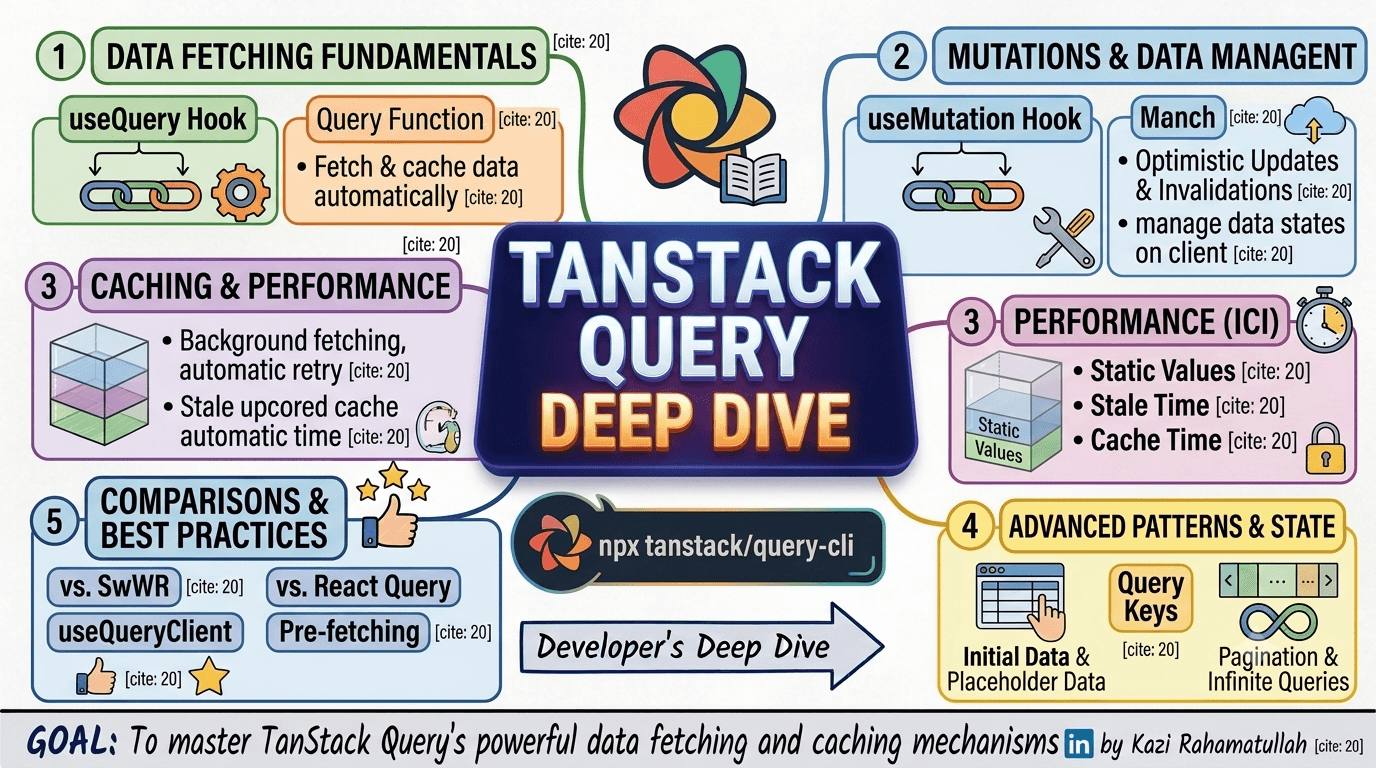
Fetching data in React used to mean wiring useEffect, useState, loading flags, error strings, and manual cache invalidation by hand. TanStack Query (formerly React Query) replaces that boilerplate with a declarative cache layer that handles background refetches, deduplication, retries, and stale-while-revalidate semantics out of the box.
This guide walks through the mental model from first useQuery call to production patterns:
- Setup —
QueryClient, provider, and DevTools - Data fetching —
useQueryand query functions - Mutations —
useMutation, optimistic updates, and cache invalidation - Caching & performance —
staleTime,gcTime, and background refetching - Advanced patterns — query keys, pagination, and infinite queries
- Best practices — prefetching,
useQueryClient, and TanStack Query vs SWR
Each section includes copy-paste examples you can adapt to REST APIs, GraphQL, or server actions.
Quick index
| # | Section |
|---|---|
| 1 | Project setup |
| 2 | useQuery fundamentals |
| 3 | Mutations & cache updates |
| 4 | Caching & performance |
| 5 | Query keys & dependencies |
| 6 | Pagination & infinite queries |
| 7 | Prefetching & useQueryClient |
| 8 | TanStack Query vs SWR |
1. Project setup
Install TanStack Query for React:
npm install @tanstack/react-query
# optional — inspect cache, queries, and mutations in dev
npm install @tanstack/react-query-devtools
Wrap your app with a QueryClient and QueryClientProvider. Create one client per app (or per test) and reuse it across renders.
// app/providers.tsx
'use client'

import { QueryClient, QueryClientProvider } from '@tanstack/react-query'
import { ReactQueryDevtools } from '@tanstack/react-query-devtools'
import { useState, type ReactNode } from 'react'

export function Providers({ children }: { children: ReactNode }) {
  const [queryClient] = useState(
    () =>
      new QueryClient({
        defaultOptions: {
          queries: {
            staleTime: 60 * 1000, // 1 minute — data stays fresh
            retry: 1,
            refetchOnWindowFocus: false,
          },
        },
      }),
  )

  return (
    <QueryClientProvider client={queryClient}>
      {children}
      <ReactQueryDevtools initialIsOpen={false} />
    </QueryClientProvider>
  )
}// app/layout.tsx
import { Providers } from './providers'
export default function RootLayout({ children }: { children: React.ReactNode }) {
return (
<html lang="en">
<body>
<Providers>{children}</Providers>
</body>
</html>
)
}2. useQuery fundamentals
useQuery takes a query key (unique cache identifier) and a query function (async fetcher). It returns data, isPending, isError, error, isFetching, and refetch.
'use client'

import { useQuery } from '@tanstack/react-query'

type Post = {
  id: number
  title: string
  body: string
}

async function fetchPosts(): Promise<Post[]> {
  const res = await fetch('https://jsonplaceholder.typicode.com/posts?_limit=5')
  if (!res.ok) throw new Error('Failed to load posts')
  return res.json()
}

export function PostList() {
  const { data, isPending, isError, error, isFetching, refetch } = useQuery({
    queryKey: ['posts'],
    queryFn: fetchPosts,
  })

  if (isPending) return <p>Loading posts…</p>
  if (isError) return <p role="alert">Error: {error.message}</p>

  return (
    <section>
      <header className="flex items-center gap-3">
        <h2>Latest posts</h2>
        <button onClick={() => refetch()} disabled={isFetching}>
          {isFetching ? 'Refreshing…' : 'Refresh'}
        </button>
      </header>
      <ul>
        {data.map((post) => (
          <li key={post.id}>{post.title}</li>
        ))}
      </ul>
    </section>
  )
}
Fetching a single resource by ID
export function PostDetail({ postId }: { postId: number }) {
  const { data, isPending, isError } = useQuery({
    queryKey: ['posts', postId],
    queryFn: async () => {
      const res = await fetch(`https://jsonplaceholder.typicode.com/posts/${postId}`)
      if (!res.ok) throw new Error('Post not found')
      return res.json() as Promise<Post>
    },
    enabled: postId > 0, // skip fetch until ID is valid
  })

  if (isPending) return <p>Loading…</p>
  if (isError) return <p>Could not load post.</p>

  return (
    <article>
      <h1>{data.title}</h1>
      <p>{data.body}</p>
    </article>
  )
}Extracting fetch logic
Keep query functions pure and reusable — colocate them in a lib/api module or feature folder.
// lib/posts.ts
export async function getPosts() {
  const res = await fetch('/api/posts')
  if (!res.ok) throw new Error('Failed to fetch posts')
  return res.json()
}

export async function getPost(id: number) {
  const res = await fetch(`/api/posts/${id}`)
  if (!res.ok) throw new Error('Failed to fetch post')
  return res.json()
}const { data } = useQuery({
queryKey: ['posts'],
queryFn: getPosts,
})3. Mutations & cache updates
useMutation handles writes — POST, PUT, PATCH, DELETE. Unlike queries, mutations do not cache their result by default. You update the server, then invalidate or optimistically patch the cache.
'use client'

import { useMutation, useQuery, useQueryClient } from '@tanstack/react-query'

type Todo = { id: number; title: string; completed: boolean }

async function createTodo(title: string): Promise<Todo> {
  const res = await fetch('/api/todos', {
    method: 'POST',
    headers: { 'Content-Type': 'application/json' },
    body: JSON.stringify({ title }),
  })
  if (!res.ok) throw new Error('Create failed')
  return res.json()
}

export function TodoApp() {
  const queryClient = useQueryClient()

  const { data: todos = [] } = useQuery({
    queryKey: ['todos'],
    queryFn: async () => {
      const res = await fetch('/api/todos')
      return res.json() as Promise<Todo[]>
    },
  })

  const createMutation = useMutation({
    mutationFn: createTodo,
    onSuccess: () => {
      // Refetch todos list after a successful create
      queryClient.invalidateQueries({ queryKey: ['todos'] })
    },
  })

  return (
    <div>
      <ul>
        {todos.map((todo) => (
          <li key={todo.id}>{todo.title}</li>
        ))}
      </ul>
      <button onClick={() => createMutation.mutate('Learn TanStack Query')} disabled={createMutation.isPending}>
        {createMutation.isPending ? 'Saving…' : 'Add todo'}
      </button>
      {createMutation.isError && <p role="alert">{createMutation.error.message}</p>}
    </div>
  )
}
Optimistic updates
For snappy UX, update the cache before the server responds, then roll back on failure.
const toggleMutation = useMutation({
  mutationFn: (todo: Todo) =>
    fetch(`/api/todos/${todo.id}`, {
      method: 'PATCH',
      headers: { 'Content-Type': 'application/json' },
      body: JSON.stringify({ completed: !todo.completed }),
    }).then((r) => r.json()),

  onMutate: async (updatedTodo) => {
    await queryClient.cancelQueries({ queryKey: ['todos'] })
    const previous = queryClient.getQueryData<Todo[]>(['todos'])

    queryClient.setQueryData<Todo[]>(['todos'], (old = []) =>
      old.map((t) => (t.id === updatedTodo.id ? { ...t, completed: !t.completed } : t)),
    )

    return { previous }
  },

  onError: (_err, _todo, context) => {
    queryClient.setQueryData(['todos'], context?.previous)
  },

  onSettled: () => {
    queryClient.invalidateQueries({ queryKey: ['todos'] })
  },
})4. Caching & performance
TanStack Query's power is its cache lifecycle. Every query moves through states: fresh → stale → garbage-collected.
| Option | What it controls |
|---|---|
staleTime | How long cached data is considered fresh (no background refetch on mount/focus) |
gcTime | How long inactive data stays in memory after the last observer unmounts (v5; was cacheTime in v4) |
retry | Automatic retry count on failure |
refetchOnWindowFocus | Refetch stale queries when the tab regains focus |
const { data } = useQuery({
  queryKey: ['profile'],
  queryFn: fetchProfile,
  staleTime: 5 * 60 * 1000, // 5 min — profile rarely changes
  gcTime: 30 * 60 * 1000, // keep in memory 30 min after unmount
})
Stale-while-revalidate in practice
// User sees cached posts instantly; a stale refetch runs in the background
const { data, isFetching, dataUpdatedAt } = useQuery({
  queryKey: ['posts'],
  queryFn: fetchPosts,
  staleTime: 30_000, // fresh for 30 seconds
})

return (
  <div>
    {isFetching && <span aria-live="polite">Updating…</span>}
    <p className="text-xs text-neutral-500">Last updated: {new Date(dataUpdatedAt).toLocaleTimeString()}</p>
    {/* render data */}
  </div>
)Automatic retry
useQuery({
  queryKey: ['health'],
  queryFn: checkHealth,
  retry: 3,
  retryDelay: (attempt) => Math.min(1000 * 2 ** attempt, 30_000), // exponential backoff
})5. Query keys & dependencies
Query keys are serializable arrays that uniquely identify cached data. Structure them from most general to most specific.
// Good — hierarchical, predictable invalidation
;[
  'posts',
] // all posts
[
  ('posts', { status: 'draft' })
] // filtered list
[
  ('posts', postId)
] // single post
[
  ('posts', postId, 'comments')
] // nested resource
[
  // Avoid — unstable keys cause unnecessary refetches
  ('posts', new Date())
] // ❌ new key every render
[('posts', { filter })] // ⚠️ only if `filter` is a stable primitive object
Dependent queries
Fetch comments only after the post loads:
const { data: post } = useQuery({
  queryKey: ['posts', postId],
  queryFn: () => getPost(postId),
})

const { data: comments } = useQuery({
  queryKey: ['posts', postId, 'comments'],
  queryFn: () => getComments(postId),
  enabled: !!post, // runs only when post exists
})
placeholderData and initialData
// Show previous page data while the next page loads (pagination UX)
useQuery({
  queryKey: ['posts', page],
  queryFn: () => getPosts(page),
  placeholderData: (previousData) => previousData,
})

// Seed cache from SSR or localStorage
useQuery({
  queryKey: ['settings'],
  queryFn: fetchSettings,
  initialData: () => JSON.parse(localStorage.getItem('settings') ?? 'null'),
  staleTime: Infinity, // treat as fresh until explicitly invalidated
})6. Pagination & infinite queries
Offset pagination
'use client'

import { useQuery } from '@tanstack/react-query'
import { useState } from 'react'

const PAGE_SIZE = 10

export function PaginatedPosts() {
  const [page, setPage] = useState(1)

  const { data, isPending, isPlaceholderData } = useQuery({
    queryKey: ['posts', 'list', page],
    queryFn: () => fetchPosts({ page, limit: PAGE_SIZE }),
    placeholderData: (prev) => prev,
    staleTime: 30_000,
  })

  return (
    <div>
      <ul>
        {data?.items.map((post) => (
          <li key={post.id}>{post.title}</li>
        ))}
      </ul>
      <div className="flex gap-2">
        <button onClick={() => setPage((p) => Math.max(1, p - 1))} disabled={page === 1}>
          Previous
        </button>
        <span>Page {page}</span>
        <button onClick={() => setPage((p) => p + 1)} disabled={isPlaceholderData || !data?.hasMore}>
          Next
        </button>
      </div>
      {isPending && <p>Loading…</p>}
    </div>
  )
}
Infinite scroll with useInfiniteQuery
import { useInfiniteQuery } from '@tanstack/react-query'
import { useEffect, useRef } from 'react'

export function InfinitePostFeed() {
  const loadMoreRef = useRef<HTMLDivElement>(null)

  const { data, fetchNextPage, hasNextPage, isFetchingNextPage, status } = useInfiniteQuery({
    queryKey: ['posts', 'infinite'],
    queryFn: ({ pageParam }) => fetchPosts({ cursor: pageParam }),
    initialPageParam: undefined as string | undefined,
    getNextPageParam: (lastPage) => lastPage.nextCursor ?? undefined,
  })

  useEffect(() => {
    const el = loadMoreRef.current
    if (!el || !hasNextPage) return

    const observer = new IntersectionObserver(
      (entries) => {
        if (entries[0]?.isIntersecting && !isFetchingNextPage) {
          fetchNextPage()
        }
      },
      { rootMargin: '200px' },
    )

    observer.observe(el)
    return () => observer.disconnect()
  }, [fetchNextPage, hasNextPage, isFetchingNextPage])

  if (status === 'pending') return <p>Loading feed…</p>

  const posts = data.pages.flatMap((page) => page.items)

  return (
    <div>
      {posts.map((post) => (
        <article key={post.id}>{post.title}</article>
      ))}
      <div ref={loadMoreRef} className="h-8" />
      {isFetchingNextPage && <p>Loading more…</p>}
    </div>
  )
}7. Prefetching & useQueryClient
Prefetch data before the user navigates so the next screen renders instantly.
import { useQueryClient } from '@tanstack/react-query'
import Link from 'next/link'

export function PostCard({ post }: { post: Post }) {
  const queryClient = useQueryClient()

  const prefetch = () => {
    queryClient.prefetchQuery({
      queryKey: ['posts', post.id],
      queryFn: () => getPost(post.id),
      staleTime: 60_000,
    })
  }

  return (
    <Link href={`/blog/${post.slug}`} onMouseEnter={prefetch} onFocus={prefetch}>
      {post.title}
    </Link>
  )
}
Server-side prefetch (Next.js App Router)
// app/posts/[id]/page.tsx
import { dehydrate, HydrationBoundary, QueryClient } from '@tanstack/react-query'
import { PostDetail } from './PostDetail'
import { getPost } from '@/lib/posts'

export default async function PostPage({ params }: { params: Promise<{ id: string }> }) {
  const { id } = await params
  const queryClient = new QueryClient()

  await queryClient.prefetchQuery({
    queryKey: ['posts', Number(id)],
    queryFn: () => getPost(Number(id)),
  })

  return (
    <HydrationBoundary state={dehydrate(queryClient)}>
      <PostDetail postId={Number(id)} />
    </HydrationBoundary>
  )
}Manual cache reads and writes
const queryClient = useQueryClient()

// Read synchronously (e.g. in an event handler)
const cached = queryClient.getQueryData<Post>(['posts', 42])

// Write without a network call
queryClient.setQueryData(['posts', 42], (old) => ({ ...old, title: 'Updated' }))

// Remove from cache
queryClient.removeQueries({ queryKey: ['posts', 42] })8. TanStack Query vs SWR
Both libraries solve async server state with stale-while-revalidate caching. The APIs differ; the mental model is similar.
| Feature | TanStack Query | SWR |
|---|---|---|
| Cache scope | Global QueryClient with explicit keys | Global SWR cache by key |
| Mutations | First-class useMutation + invalidation | mutate helper, less structured |
| DevTools | Built-in React Query Devtools | Limited built-in tooling |
| Infinite scroll | useInfiniteQuery with page params | useSWRInfinite |
| Ecosystem | React, Vue, Solid, Svelte adapters | React-focused |
| Learning curve | More options, steeper initially | Minimal API, faster to start |
// SWR equivalent of a basic query
import useSWR from 'swr'

const fetcher = (url: string) => fetch(url).then((r) => r.json())

function PostListSWR() {
  const { data, error, isLoading, mutate } = useSWR('/api/posts', fetcher)
  // ...
}Summary
TanStack Query turns server state from scattered useEffect blocks into a predictable cache with explicit keys, lifecycle options, and mutation workflows. Start with useQuery + structured keys, add useMutation with invalidation, then tune staleTime and gcTime per resource. Prefetch and dehydrate when navigation latency matters.
Next reads: Next.js Caching & Rendering for how server caching complements client-side query caches, and MERN Course: React Essentials for broader React patterns.
Subscribe to my newsletter
Stay up to date and get notified when I share new contents.
No spam ever, unsubscribe anytime